Making Cost Reduction More Purely
Seeing common CNC machining scenarios: cumbersome fixtures, piles of scrap material, long machining hours. As an engineer, what comes to your mind?
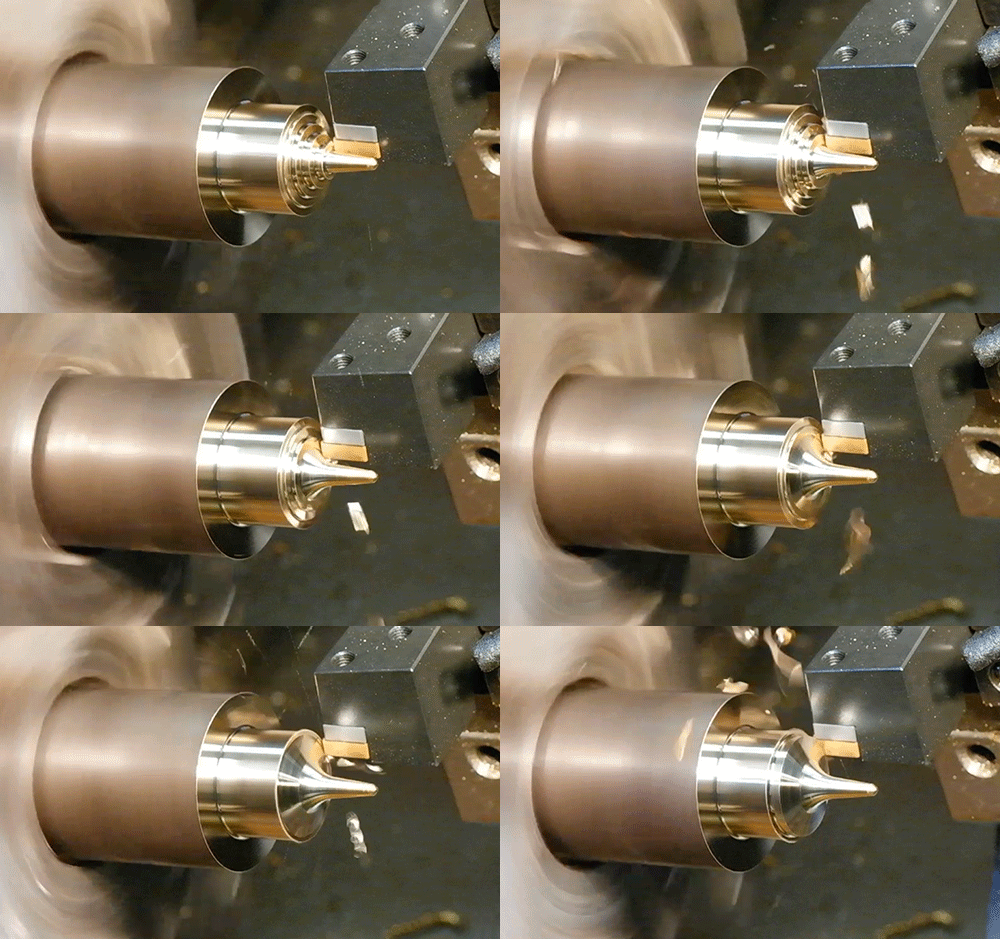
Having been immersed in cost-saving design for too long, what comes to my mind when I see this scene is: How expensive this must be! Each piece of scrap is bought with money, and each rotation of the high-speed cutting tool is an expenditure of cash.
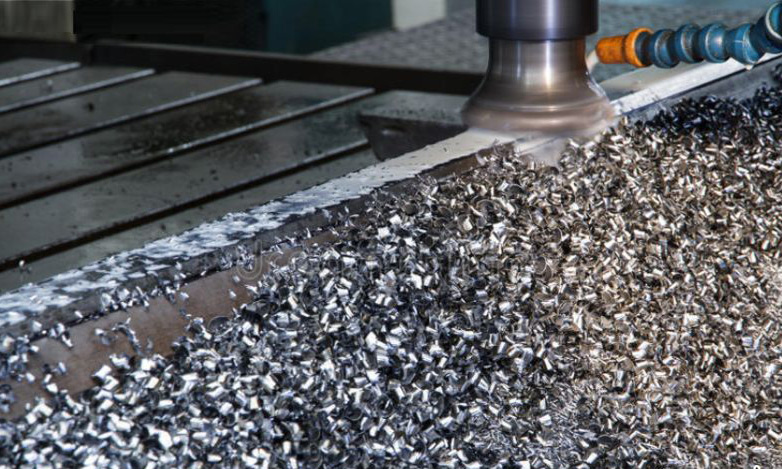
That's right! Among the many part manufacturing processes, CNC machining is one of the most expensive. This article will introduce 16 cost-saving design tips for CNC machining.
? CNC Cost Drivers
- Machining Time: The longer the machining time, the higher the CNC cost. This is a primary cost driver.
- Material Cost: The cost of the raw material blank is a significant component, which can be reduced by optimizing designs to use standard blanks and minimize scrap.
- Setup Time: For small batch production, geometry preparation and machining planning have a significant impact (fixed costs). Costs can be amortized through larger production volumes.
- Other Design Factors: Special requirements (tight tolerances, thin-walled designs) necessitate special tools, stricter quality control, slower machining speeds, and more complex machining steps, all of which severely impact CNC costs.
Once we understand the cost drivers of CNC machining, we can adopt corresponding cost-saving design measures to reduce CNC costs.
? 16 Cost-Saving Design Tips
? Cost-Saving Design #1 – Use Radii at Internal Vertical Corners
- Core Problem: All CNC tools have a cylindrical shape. When machining a pocket, a radius equal to the tool's size is created at the junction of vertical walls. If the design's internal corner radius is too small, a smaller tool must be used, meaning increased machining time. Small tools are less efficient than larger ones, leading to increased machining time and cost.
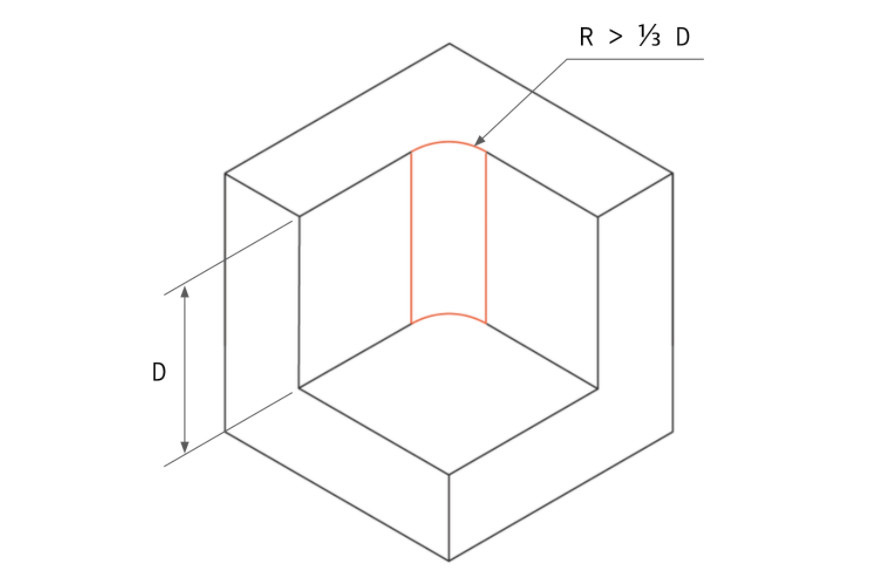
Internal corner radius should be at least 1/3 of the pocket depth. - Cost-Saving Measures:
- The radius should be at least 1/3 of the pocket depth; the larger, the better.
- Keep all radii the same size to allow machining with the same tool.
- Design a small 0.5mm or 1mm radius at the pocket floor, or leave it sharp.
- Ideally, the radius should be slightly larger than the tool radius to reduce tool load (e.g., pocket depth 12mm, radius ≥5mm, allowing use of a D8 tool for efficient machining).
If a radius cannot be used due to design requirements (e.g., this area needs to mate with another square part), to avoid a small radius, consider the following design:
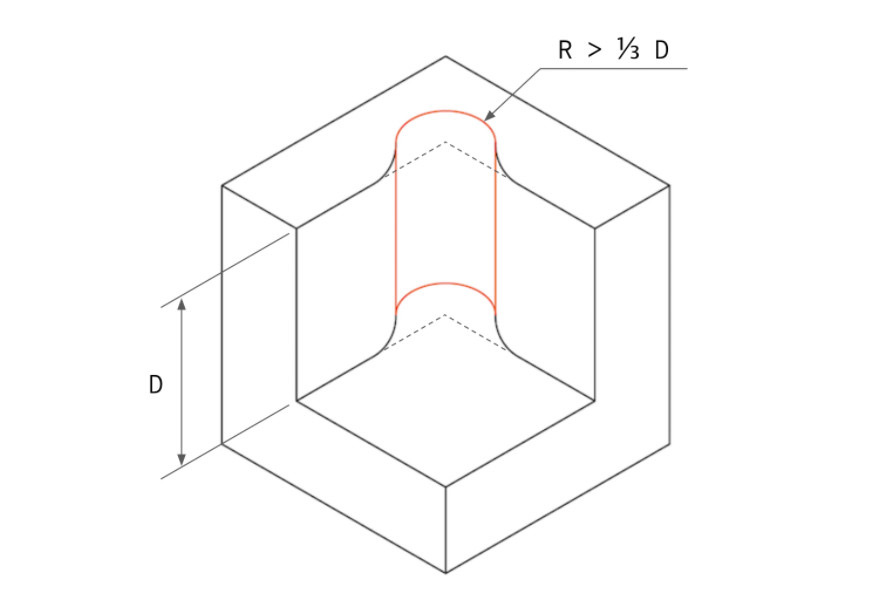
Corner design for mating with a square part.
? Cost-Saving Design #2 – Reduce Pocket Depth
- Core Problem: Machining pockets requires removing a lot of material, which is time-consuming. Tools have limited cutting depths; excessive depth increases cost.
CNC tools have certain depth limitations. Pockets perform best when the depth is 2-3 times the tool diameter. For example, a 12mm diameter end mill can safely machine a pocket up to 25mm deep.
Machining deeper pockets is possible, up to a maximum of 4 times the tool diameter, but this increases cost, especially when using multi-axis CNC machines. - Cost-Saving Measures:
- Pocket depth should not exceed 4 times its width/length.
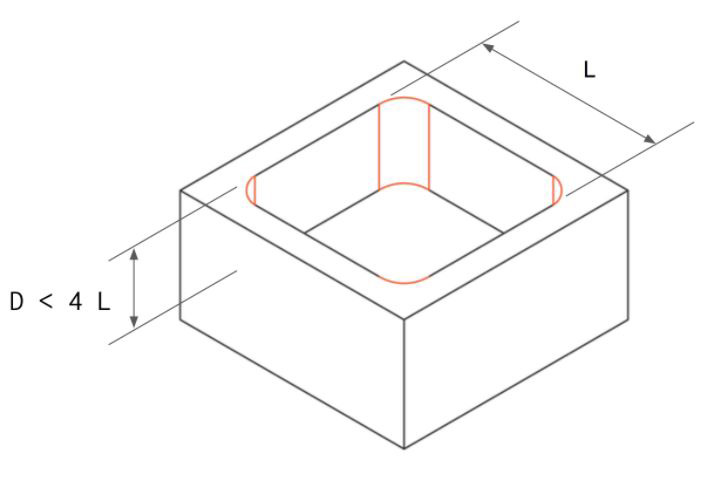
- Pocket depth should not exceed 4 times its width/length.
? Cost-Saving Design #3 – Avoid Thin Walls
Unless specifically required, avoid thin-walled designs because thin walls lack strength and are costly to machine.
- Thin walls are prone to deformation or even breakage during machining. To prevent this, more complex toolpaths are needed, consuming more machining time. Thin walls are also more prone to vibration, making high-precision machining a significant challenge.
- Cost-Saving Measures:
- Metal part wall thickness should be at least 0.8mm (minimum achievable 0.5mm, not recommended).
- Plastic part wall thickness should be at least 1.5mm (minimum achievable 1.0mm, not recommended).
- When designing holes (including through holes and threaded holes) or slots near part edges, thin walls often occur. Ensure the above guidelines are followed.
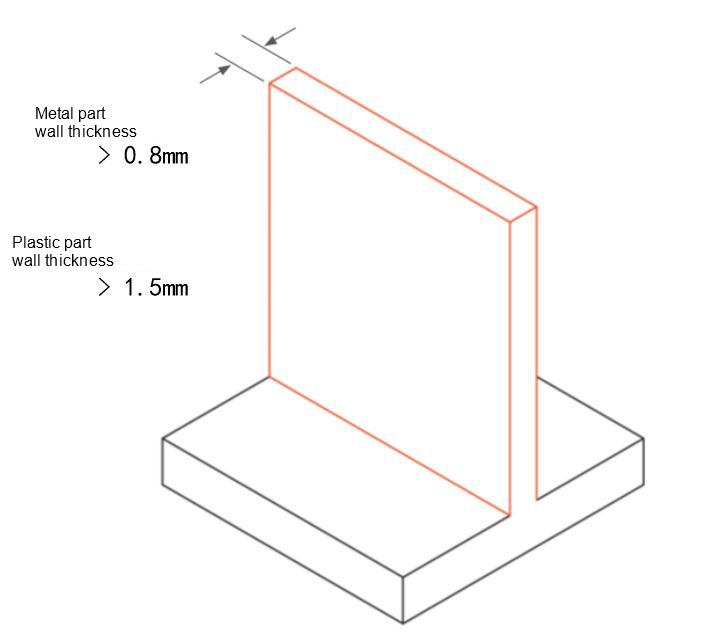
Avoid thin walls to shorten machining time.
? Cost-Saving Design #4 – Reduce Thread Depth
- Unnecessary thread depth increases CNC machining cost because it requires special tools. Remember: Excessive thread depth (beyond 3 times the hole diameter) does not increase connection strength.
- Cost-Saving Measures:
- Thread depth should be at most 3 times the hole diameter.
- For blind tapped holes, leave at least 1/2 the hole diameter as extra length at the hole bottom.
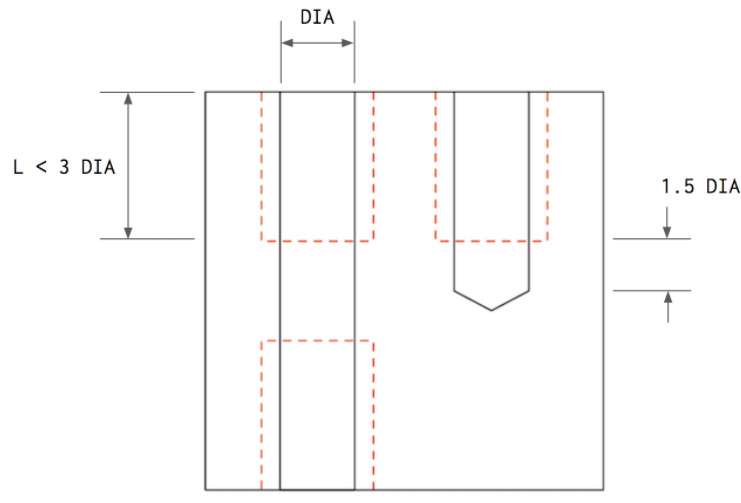
Thread depth should not exceed 3 times the hole diameter.
? Cost-Saving Design #5 – Design Standard-Size Holes
- Core Problem: Non-standard holes require end mills, increasing cost. Deep holes are difficult and costly to machine.
- Cost-Saving Measures:
- Prioritize designing standard-size holes that can be drilled quickly and accurately with standard drill bits.
- Hole depth should not exceed 4 times its diameter (deep holes up to 10 times diameter are possible but require caution).
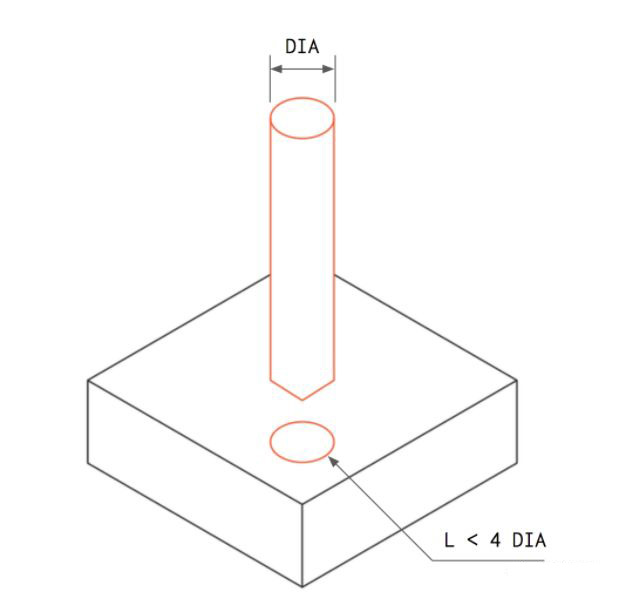
? Cost-Saving Design #6 – Avoid Tight Tolerance Requirements
- Core Problem: Tight tolerances require complex processes, more inspections. Internal features with tight tolerances are harder to guarantee, increasing labor and time costs.
Defining part dimensional tolerances must be taken seriously. Avoid assigning tolerances arbitrarily. Only define tolerances where needed, and resort to tight tolerances only when absolutely necessary.
If no tolerances are defined in the part drawing, the part will be machined to standard tolerances (±0.2mm or looser), which is sufficient for most non-critical dimensions and significantly reduces machining cost.
Tight tolerances are even harder to guarantee for internal features. For example, when machining internally intersecting holes or slots, small defects like burrs easily appear at edges due to force-induced deformation.
These features require inspection and deburring, which can only be done manually, resulting in high labor costs and time consumption, thus increasing cost. - Cost-Saving Measures:
- Define tight tolerances only when absolutely necessary.
- Dimension all features from a single datum.
- Remember: Decimal places in tolerances are important. They define the precision level and the type of measuring tool required. For example, two decimal places can be measured with calipers; three decimal places require micrometers or CMMs. To reduce cost, avoid unnecessary decimal places.
- Optimize product design to avoid tight tolerances, e.g., by shortening dimension chains, using locating features, etc.
In product structural design, the core is to achieve economical tolerance allocation by controlling tolerance accumulation, reducing manufacturing costs while improving product yield. Key strategies can be summarized into three categories:
Shorten dimension chains: Reduce part count or optimize assembly sequence so key dimensions relate to few parts, avoiding complex chain structures; or adjust dimension chain structure to reduce the cumulative effect of multiple tolerances.
Clever use of locating features: Design locating pins, guide holes, and other easily controlled locating structures to achieve part self-alignment with high-precision datums. Only the tolerances of locating features need strict control, while other non-critical dimensions can be loosened, improving assembly efficiency simultaneously.
Auxiliary optimization methods: Use point/line - plane fits instead of plane - plane fits to reduce requirements for flatness and surface roughness; provide sufficient assembly operation space to reduce human assembly error.
Note: Plan these strategies early in the design phase to avoid later modification costs. If tolerance analysis fails to meet requirements, negotiate with customers to adjust non-critical requirements like appearance. Tolerances related to core functions cannot be changed arbitrarily.
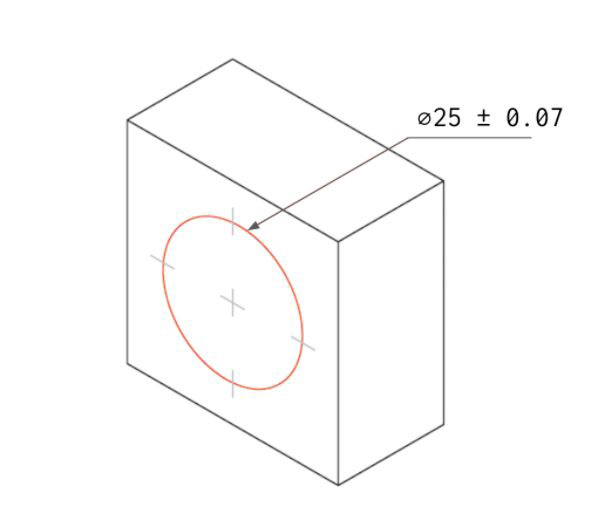
Only define tolerances where needed.
? Cost-Saving Design #7 – Reduce Number of Setups
Minimize the number of part setups as much as possible. Ideally, only one setup is needed.
For example, a part with blind holes on both sides requires two setups: one side is machined, then the part is rotated and re-fixtured to machine the other side.
Rotating or repositioning a part increases machining cost because setup is typically done manually. Also, complex part geometries may require custom fixtures, further increasing cost. Extremely complex parts may require multi-axis CNC machines, further increasing cost due to their high hourly rates.
Consider splitting a complex part into multiple parts for CNC machining, then fastening them together via threads or welding.
- Core Problem: Multiple setups require manual operation. Complex structures may need custom fixtures or multi-axis machines (high hourly rates), increasing cost.
- Cost-Saving Measures:
- Design parts to require only one setup.
- If not possible, split complex parts into multiple components for separate CNC machining, then assemble via threads or welding.
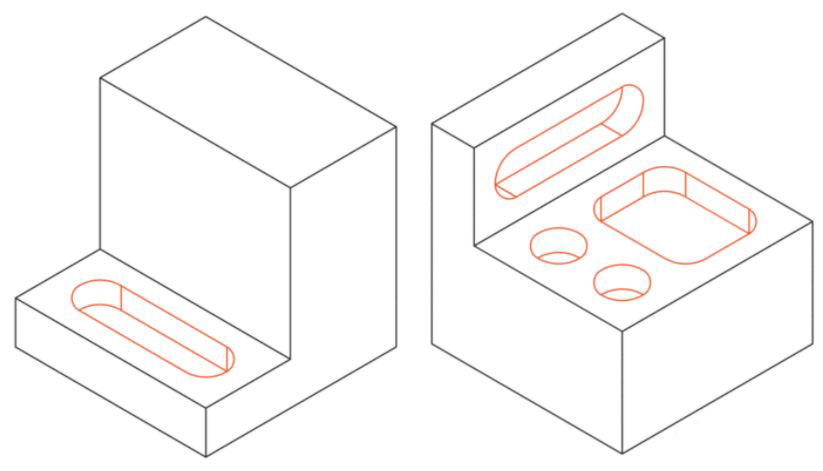
Example part requiring two setups.
? Cost-Saving Design #8 – Avoid Small Features with High Aspect Ratios
During CNC machining, small features with high aspect ratios are prone to vibration, making precise machining difficult. To avoid this, such small features should be connected to thicker walls or supported by ribs.
- Core Problem: Small features with high aspect ratios vibrate easily, making precise machining difficult.
- Cost-Saving Measures:
- Avoid designing features with aspect ratios (Height/Width) exceeding 4.
- Connect small features to thicker walls, or add ribs for support.
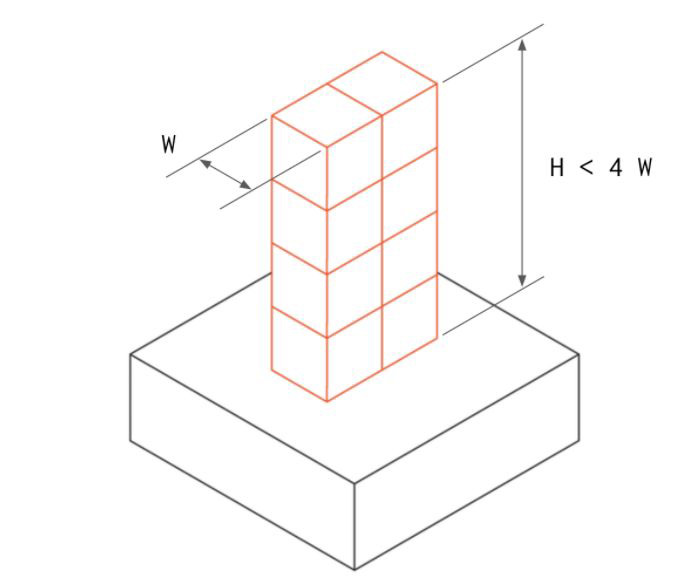
Avoid high aspect ratios.
? Cost-Saving Design #9 – Remove Text and Symbols from Part Surfaces
Text and symbols on part surfaces significantly increase CNC cost because they require additional machining steps and more time.
Surface treatment techniques like silk screening or painting can be used to add text and symbols to CNC parts, which is a more cost-effective method.
- Core Problem: Surface text/symbols require additional machining steps. Raised text requires removing more material, increasing cost.
- Cost-Saving Measures:
- Try to remove text and symbols from part surfaces.
- If text and symbols are necessary, choose recessed (engraved) rather than raised (embossed) styles, as the latter requires removing more material.
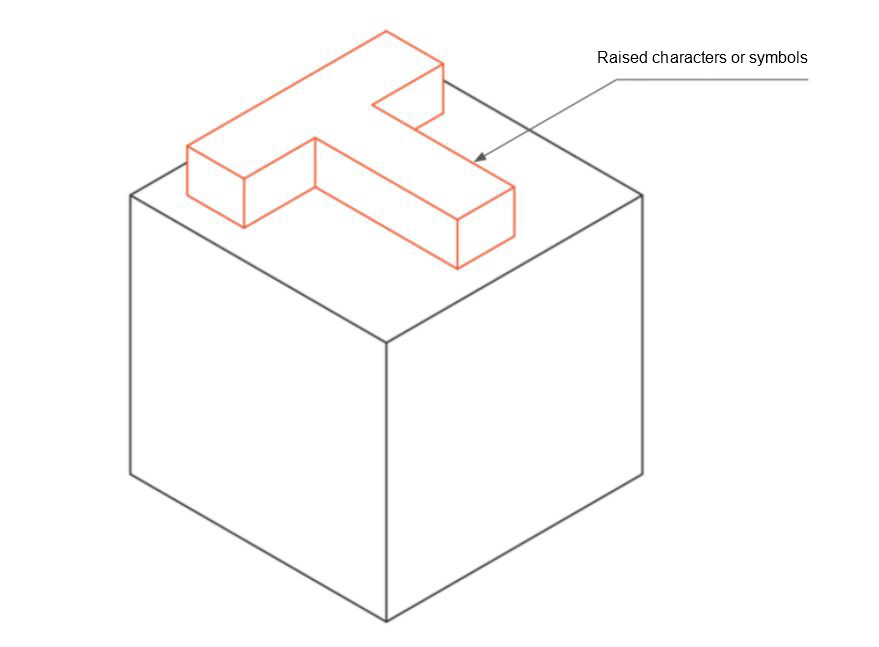
Text and symbols on part surfaces increase cost.
? Cost-Saving Design #10 – Consider Material Machinability
Material machinability refers to how easy a material is to machine.
Better machinability means the part is easier to CNC machine, resulting in lower cost.
Material machinability depends on physical properties. Generally, softer, more ductile materials are easier to machine.
For example, Brass C360 has the highest machinability and can be machined at high speeds. Aluminum alloys (6061 and 7075) are also easily machined.
Steel has low machinability. Compared to aluminum, steel requires more than double the machining time. Of course, machinability varies among steels. Stainless steel 304 has a machinability rating of 45%, while stainless steel 303 is rated at 78%, making the latter easier to machine.
The machinability of plastics depends on their stiffness and thermal properties. During CNC machining, plastics easily melt and deform at high temperatures.
POM is the easiest plastic to machine, followed by ABS. PEEK and Nylon are common engineering plastics that are difficult to machine.
- Core Problem: The difficulty of machining a material directly affects machining time and cost.
- Cost-Saving Measures:
- Where possible, choose materials with good machinability:
- Metals: Brass C360 (best), Aluminum 6061/7075, Stainless 303 (78%) is better than 304 (45%).
- Plastics: POM (best), ABS next. Avoid PEEK and Nylon if possible.
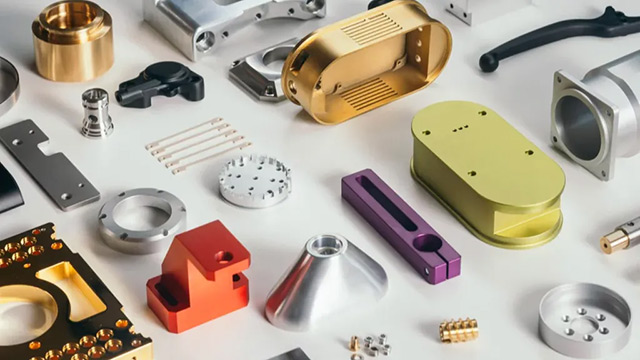 [img]
[img]
- Where possible, choose materials with good machinability:
? Cost-Saving Design #11 – Consider Raw Material Blank Cost
- Core Problem: Blank material cost is a key factor in CNC cost. Balance price with machinability.
- Common Material Blank Price Comparison (size 150×150×25mm, prices for reference only):
| Raw Material | Blank Price ($) |
|---|---|
| Aluminum 6061 | 24 |
| ABS | 16 |
| POM | 25.5 |
| Nylon 6 | 29 |
| Aluminum 7075 | 76 |
| Stainless 304 | 87 |
| Brass C360 | 143 |
| Stainless 303 | 142 |
| PEEK | 285 |
Aluminum 6061 is clearly cost-effective, with low blank cost and good machinability, making it ideal for prototyping.
Stainless 303 and Brass C360 also have good machinability, allowing high efficiency and short machining times, but their blank costs are high. Therefore, they are only suitable for large-volume production where the high blank cost is balanced by short machining time through economies of scale.
Plastic materials like ABS, Nylon, and POM have costs similar to Aluminum 6061. However, they are more difficult to machine, resulting in higher CNC costs. PEEK is a very expensive material and should only be used when necessary.
- Cost-Saving Measures: For prototyping and small batches, prioritize materials with lower blank costs (e.g., Aluminum 6061, ABS).
? Cost-Saving Design #12 – Consider Blank Size
Blank size affects CNC cost: To ensure dimensional accuracy, material must be machined off all faces of the part. This can significantly increase material cost, especially in larger batches.
- Core Problem: Oversized blanks lead to material waste; undersized blanks affect machining accuracy.
- Cost-Saving Measures:
- Blank size should be at least 3mm larger than the part (e.g., part 30×30×30mm, choose 35×35×35mm blank. If part is 27×27×27mm, a 30×30×30mm blank can be chosen, saving material cost).
- Consult suppliers for standard blank sizes and design part dimensions close to standard sizes to minimize scrap.
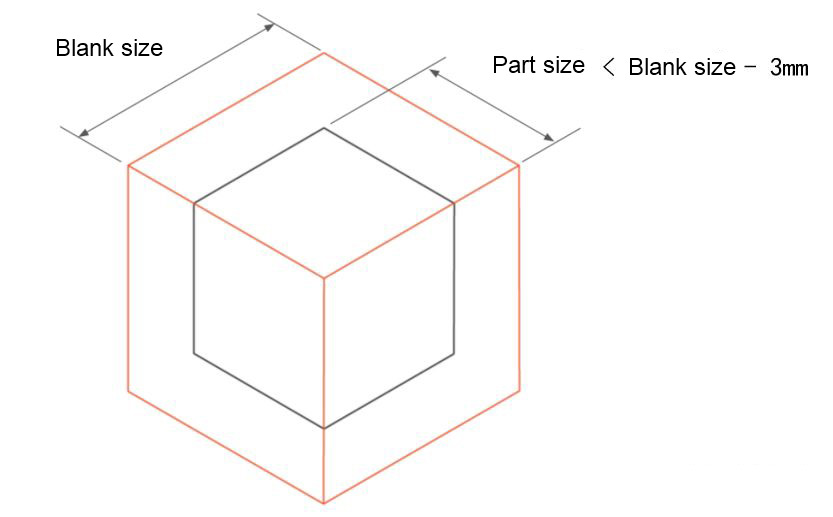
Blank size should generally be at least 3mm larger than the part.
? Cost-Saving Design #13 – Avoid Multiple Surface Finishes
Surface finishes can improve the appearance of CNC parts and enhance resistance to harsh environments, but they also add cost.
If a CNC part requires multiple different surface finishes, cost increases further because more steps are needed, such as masking certain areas.
- Cost-Saving Measures:
- Eliminate surface finishes when not necessary.
- When surface finishes are needed, avoid multiple types of finishes on the same part.
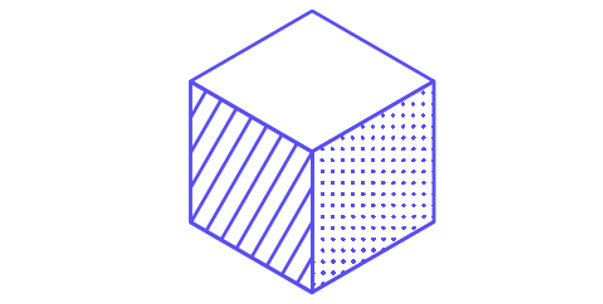
Avoid multiple surface finishes.
? Cost-Saving Design #14 – Produce in Larger Quantities
In CNC machining, batch size affects cost because programming and initial setup costs are amortized over each part. With smaller batches, this amortized cost per part is higher.
With larger batches, setup cost per part is lower. The larger the batch, the lower the CNC cost, especially noticeable with very small batches: even a small increase in quantity can significantly reduce cost. Increasing the batch from 1 to 5 parts can reduce per-part cost by over 50%.
- Core Problem: With small batches, programming + initial setup cost per part is high, leading to high unit cost.
- Cost-Saving Measures:
- Place larger consolidated orders instead of multiple small ones.
- Increasing batch from 1 to 5 parts can reduce cost by over 50%.
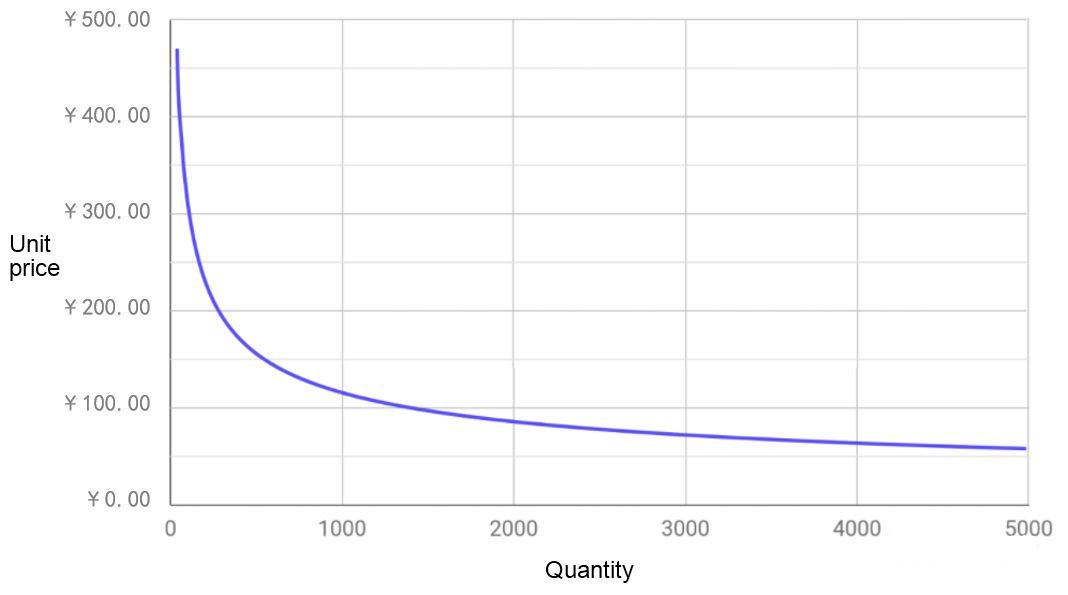
Large batch production reduces cost.
? Cost-Saving Design #15 – Design Axisymmetric Parts
Axisymmetric parts can be machined using lathes or milling machines, whose hourly rates are much lower than 3-axis or 5-axis machining centers.
- Core Problem: Non-symmetric parts require 3-axis/5-axis machining centers with high hourly rates. Symmetric parts can use lathes or mills, reducing cost.
- Cost-Saving Measures: Try to design axisymmetric part geometries.
? Cost-Saving Design #16 – Use Alternative Processes Instead of CNC Machining
As mentioned at the beginning, CNC machining is an expensive process. Therefore, no matter how much cost is reduced, it remains relatively high.
With modern manufacturing processes evolving rapidly, consider using alternative processes instead of CNC. Don't be stuck in the mindset that because a previous generation product used CNC, the new one must too.
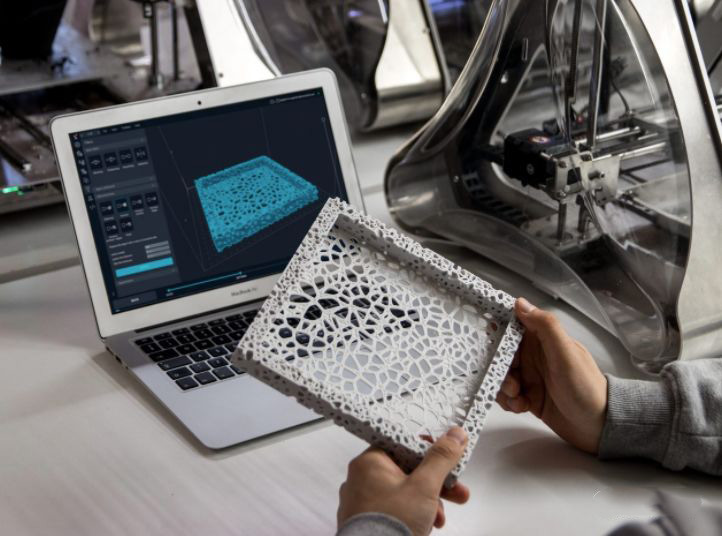
3D Printing
As shown below, for small batches, 3D printing cost is lower than CNC machining. For larger batches, forming processes like investment casting and injection molding are cheaper than CNC.
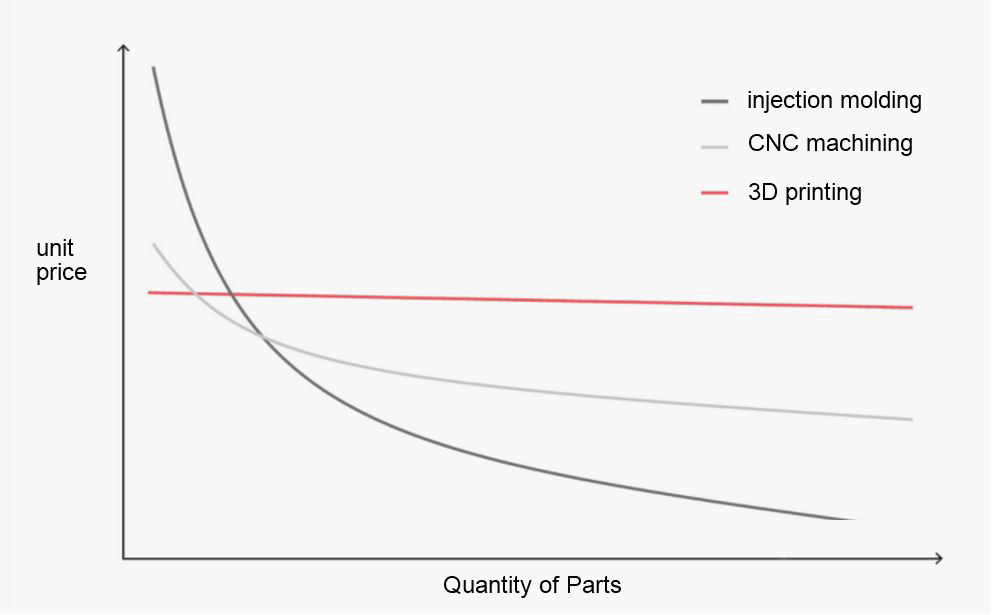
- Core Problem: CNC machining itself is expensive. Different batch sizes have more optimal process choices.
- Process Selection Recommendations by Batch Size:
| Part Quantity | <10 | 10~100 | 100~1000 | >1000 |
|---------------|--------------|---------------------|-----------------------|--------------|
| Plastic | 3D Printing | 3D Printing (consider CNC) | CNC (consider Injection Molding) | Injection Molding |
| Metal | 3D Printing & CNC | CNC (consider 3D Printing) | CNC (consider Investment Casting) | Investment Casting or Die Casting |
In many cases, 3D printing is better than CNC machining: 3D printing can produce more geometrically complex parts. 3D printing can provide samples within 24 hours. For very low quantities, 3D printing is usually cheaper. 3D printing can process materials difficult for CNC, like superalloys.
- Cost-Saving Measures: Based on part quantity and material, choose alternative processes like 3D printing, injection molding, investment casting, etc. (3D printing suits small batches, complex geometries; injection/die casting suits large batches).
Note: The same applies to other manufacturing and fastening processes, including injection molding, stamping, welding, and riveting. During initial process selection in product design, strive to find a better process—there likely is one, even if you currently don't know it.
? Final Words
Cost-saving design is a very challenging task, and currently, engineers generally lack knowledge in this area. In the first few years of actual product development experience, cost was often not considered during design, with the simplistic belief that "the customer is first" and "the customer is supreme," thinking the engineer's duty is to meet customer requirements, leaving cost to the manufacturing department.
This is a mistaken understanding of product cost:
- Product cost holds a very high position in product development. As advocated by Integrated Product Development (IPD), product development is an investment. If product cost is too high and doesn't bring profit—or even causes losses—to the enterprise, even if customers are satisfied, such product development wastes the enterprise's financial and human resources, creating no value. This approach will eventually lead to the enterprise being eliminated.
- Over 85% of product cost is determined by product design; the remaining 15% is determined by manufacturing. If cost-oriented design is not practiced during product design, it inevitably leads to excessively high production costs. Cost-oriented design is essential.
To practice cost-oriented product design, enterprises and engineers must first change their mindset and raise cost awareness. One day, when engineers lose sleep over every design detail, pondering:
- Should the part wall thickness be 4mm or 5mm?
- Should the fillet radius be 0.3mm or 0.5mm?
- Should the critical dimension tolerance be 0.05mm or 0.1mm?
Then we can say engineers have developed initial cost awareness. Without such awareness, an engineer is not an engineer but merely a draftsman who can use Creo, UG, or SolidWorks. If engineers don't change, don't strive to learn, and only position themselves as draftsmen, they will never achieve a career breakthrough. One day they may wake up to find their jobs replaced by AI.
Some engineers believe cost is the enterprise's concern, and whether the enterprise profits has little to do with them. To them, I can only wish that when the company downsizes, you won't be the one cut.